1
/
of
5
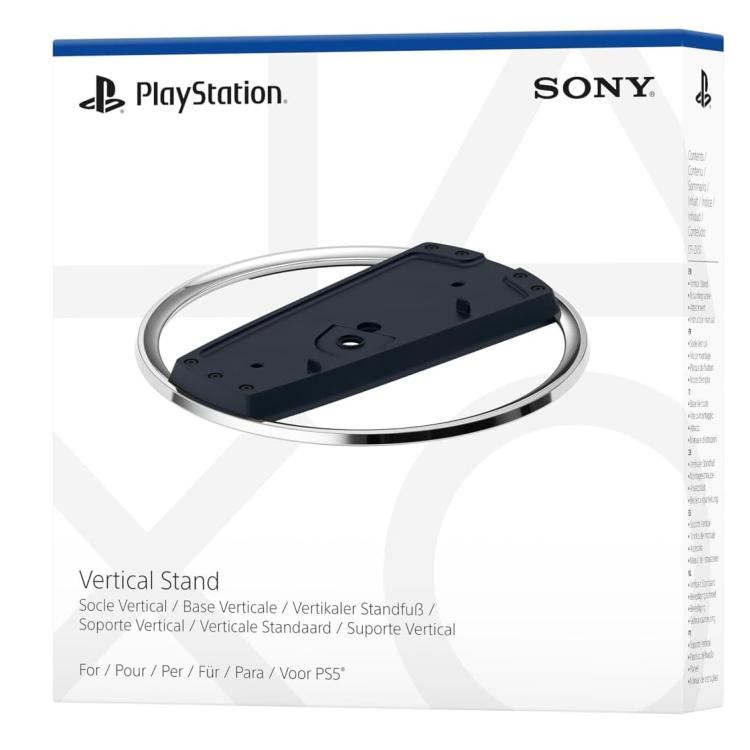
Sony PS5 Slim Vertical Stand for PlayStation 5 Console Vertical Stand New
Sony PS5 Slim Vertical Stand for PlayStation 5 Console Vertical Stand New
Regular price
€31,90 EUR
Regular price
Sale price
€31,90 EUR
Taxes included.
Shipping calculated at checkout.
Vertical stand for PS5® consoles
Color:Black
Vertical stand for PS5 consoles.
Stand your PS5® console upright in style. The PS5® Vertical Stand securely holds your console in an upright position.
How to attach a vertical stand to your PS5 console
How you set up your vertical stand depends on which type of PS5® console you own. Your PS5 model number is on the PS5 console’s original packaging and on the bottom of your PS5 console.
How to attach the stand to a PS5 console (CFI-2000 model group – slim)
Place your console on a soft cloth spread on a flat surface before attaching the stand.
Step 1
Go to the control centre and select Power > Turn off PS5. The screen goes black, the power indicator blinks white, and then turns off.
Step 2
Position your PS5® console with its rear side facing up, then remove the screw hole cap.
Step 3
Attach the screw hole cap to the screw hole (marked with a triangle and circle) on the stand.
Step 4
Align the screw hole (marked with a cross and square) on the stand with the screw hole on the console, then fasten with the mounting screw by hand. You can also use a coin to tighten the screw.
How to attach the stand to a PS5 console (CFI-1000 model group)
Place your console on a soft cloth spread on a flat surface before attaching the stand.
Step 1
Go to the control centre and select Power > Turn off PS5. The screen goes black, the power indicator blinks white, and then turns off.
Step 2
Attach the attachment to the stand. Insert the attachment into the raised part of the stand.
Step 3
Position your PS5 console with its rear side facing up, then remove the screw hole cap.
Step 4
Attach the screw hole cap to the screw hole (marked with a cross and square) on the stand. You can also use a coin to tighten the screw.
Step 5
Align the screw hole (marked with a triangle and circle) on the stand with the screw hole on the console, then fasten with the mounting screw by hand. You can also use a coin to tighten the screw.
*Compatible hardware: PS5 model group CFI-1000, PS5 model group CFI-2000 – slim.
Household limits may apply.
Design and specifications are subject to change without notice.
© 2023 Sony Interactive Entertainment LLC. “PlayStation” and “PS5” are registered trademarks or trademarks of Sony Interactive Entertainment Inc.
Color:Black
Vertical stand for PS5 consoles.
Stand your PS5® console upright in style. The PS5® Vertical Stand securely holds your console in an upright position.
How to attach a vertical stand to your PS5 console
How you set up your vertical stand depends on which type of PS5® console you own. Your PS5 model number is on the PS5 console’s original packaging and on the bottom of your PS5 console.
How to attach the stand to a PS5 console (CFI-2000 model group – slim)
Place your console on a soft cloth spread on a flat surface before attaching the stand.
Step 1
Go to the control centre and select Power > Turn off PS5. The screen goes black, the power indicator blinks white, and then turns off.
Step 2
Position your PS5® console with its rear side facing up, then remove the screw hole cap.
Step 3
Attach the screw hole cap to the screw hole (marked with a triangle and circle) on the stand.
Step 4
Align the screw hole (marked with a cross and square) on the stand with the screw hole on the console, then fasten with the mounting screw by hand. You can also use a coin to tighten the screw.
How to attach the stand to a PS5 console (CFI-1000 model group)
Place your console on a soft cloth spread on a flat surface before attaching the stand.
Step 1
Go to the control centre and select Power > Turn off PS5. The screen goes black, the power indicator blinks white, and then turns off.
Step 2
Attach the attachment to the stand. Insert the attachment into the raised part of the stand.
Step 3
Position your PS5 console with its rear side facing up, then remove the screw hole cap.
Step 4
Attach the screw hole cap to the screw hole (marked with a cross and square) on the stand. You can also use a coin to tighten the screw.
Step 5
Align the screw hole (marked with a triangle and circle) on the stand with the screw hole on the console, then fasten with the mounting screw by hand. You can also use a coin to tighten the screw.
*Compatible hardware: PS5 model group CFI-1000, PS5 model group CFI-2000 – slim.
Household limits may apply.
Design and specifications are subject to change without notice.
© 2023 Sony Interactive Entertainment LLC. “PlayStation” and “PS5” are registered trademarks or trademarks of Sony Interactive Entertainment Inc.
Share